HARMONIC · Interactive Demo
Shipboard Maintenance
A robot teammate hears a problem, reasons about it, and brings the fix, on a humanoid, a tabletop arm, and in simulation.
The full scenario on an R1 humanoid robot. The human reports an overheating engine, the robot works through the diagnosis in conversation, then picks up the part and hands it over.
The same scenario on a tabletop robot arm. HARMONIC's reasoning panels and behavior tree run alongside the camera views as the arm picks up the thermostat.
The same scenario in simulation. A simulated ground robot asks what the thermostat looks like, then searches for it, picks it up and brings it back, with HARMONIC's reasoning panels shown alongside.
Human-Robot Teaming Demo: Shipboard Engine Maintenance
In a shipboard maintenance team, the robot assistant LEIA interacts conversationally with the maintenance mechanic Daniel, assists in diagnosing engine issues, and supports maintenance tasks by locating and retrieving necessary replacement parts.
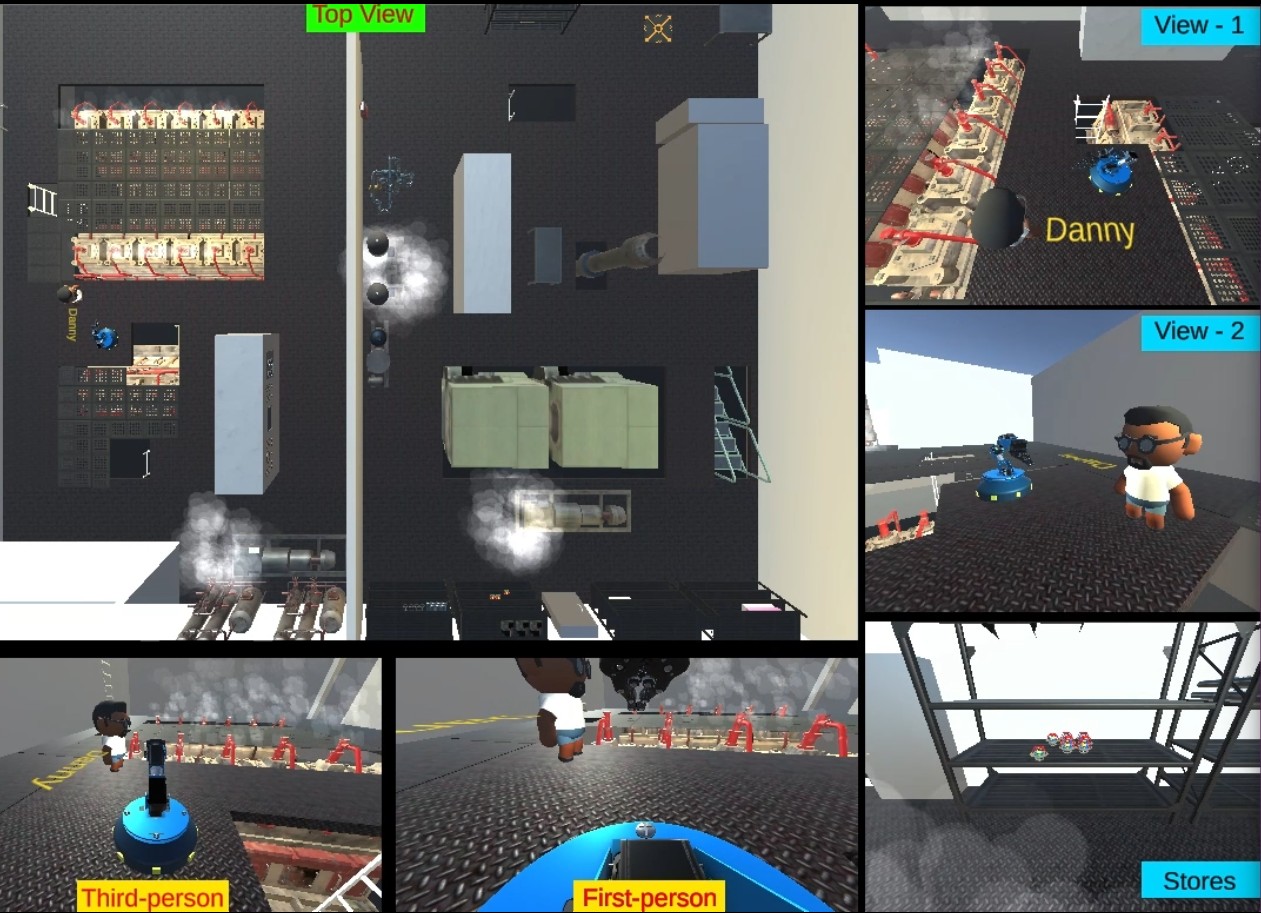
Shipboard layout for simulations (Click to zoom)
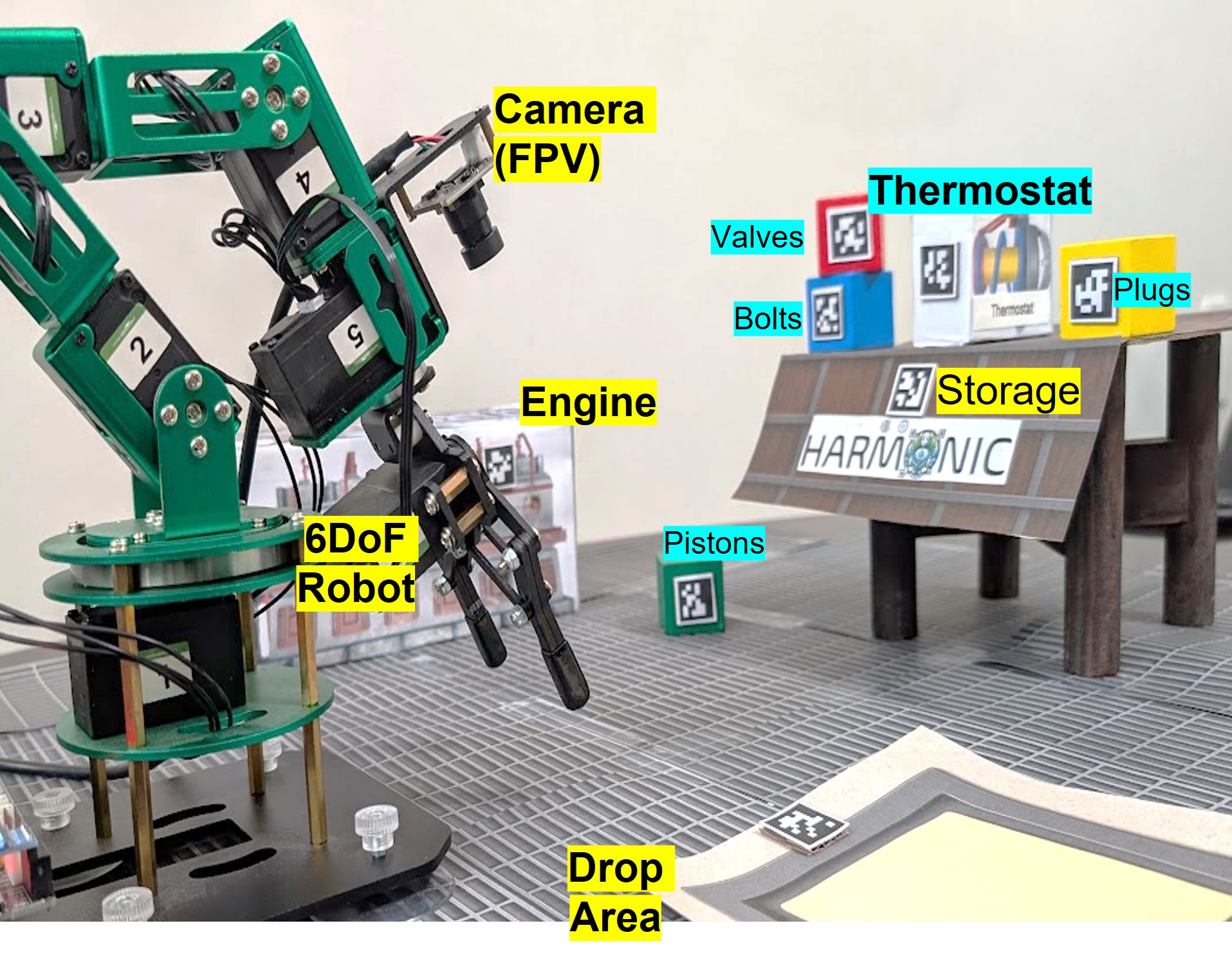
Tabletop setup emulating the shipboard task (Click to zoom)
Step through the reasoning
Follow one conversation, one step at a time, from the first spoken sentence to the hand-over. Click “Next” or any step number to begin. For the system overview, see Architecture.
What's happening: A human crew member reports a problem to the HARMONIC robot assistant. The system needs to understand not just the words, but the meaning and context behind them.
HARMONIC's interpretation: The system recognizes this as a mechanical problem description and creates a structured representation:
#DESCRIBE-MECHANICAL-PROBLEM.1
    agent               #HUMAN.1            // The speaker is describing
    beneficiary         #LEIA.1             // to the robot
    theme               #OVERHEAT.1         // the overheating.

#OVERHEAT.1
    theme               #ENGINE.1           // The engine is what is overheating.

#ENGINE.1
    corefer             ->ENGINE.1          // It is understood as the specific engine in the room.

#MODALITY.1
    attributed-to       #HUMAN.1            // The speaker
    type                BELIEF              // believes
    value               0.8                 // with relative certainty
    scope               #ASPECT.1           // that

#ASPECT.1
    scope               #OVERHEAT.1         // the state of overheating
phase CONTINUE // is happening now.What's happening: HARMONIC's knowledge base contains "conversation patterns" that help it understand what typically happens after certain types of statements. This is like knowing that after someone says "I have a problem," you usually ask "What's wrong?" or offer help.
HARMONIC's reasoning: The system recognizes this as a problem description and knows that the appropriate response is to investigate potential causes. This is defined in the ontology as an "adjacency pair" - a conversation pattern:
@DESCRIBE-MECHANICAL-PROBLEM
    agent                   /HUMAN.1
    beneficiary             /LEIA.1
    theme                   /MECHANICAL-PROBLEM.1
    adjacency-pair-next     /HYPOTHESIZE-MECHANICAL-PROBLEM-CAUSE.1

/HYPOTHESIZE-MECHANICAL-PROBLEM-CAUSE.1
    agent                   /LEIA.1                 // The hypothesizer is the describee,
    beneficiary             /HUMAN.1                // the hypothesizee is the describer,
theme /MECHANICAL-PROBLEM.1 // and the hypothesized cause is based on the described problem.What's happening: Based on the conversation pattern, HARMONIC creates a specific plan to respond appropriately. Think of this like a human deciding "I should help diagnose this problem" after hearing about an issue.
HARMONIC's action: The system creates a concrete plan and adds it to its task list (agenda):
Plan.1
    #HYPOTHESIZE-MECHANICAL-PROBLEM-CAUSE.1
        agent               #LEIA.1                             // The agent will respond
        beneficiary         #HUMAN.1                            // to the speaker,
theme #OVERHEAT.1 // about the engine's temperature.What's happening: HARMONIC needs to know exactly what to do to fulfill this plan. This is like a human thinking "To help diagnose this, I need to search my knowledge for possible causes."
HARMONIC's procedure: The system defines a specific action to take - this is a simple, atomic action that can't be broken down further:
@HYPOTHESIZE-MECHANICAL-PROBLEM-CAUSE
    *take-this-action       "Search the ontology for potential causes of the described problem report."
// Requires a @SPEECH-EFFECTOR.What's happening: HARMONIC is now executing its plan to help diagnose the overheating problem. This is like a human mechanic thinking through what could cause an engine to overheat.
HARMONIC's execution process:
a) Check prerequisites: The system verifies it can proceed (no missing information or blocked conditions)
b) Execute the procedure: HARMONIC searches its knowledge base for relevant information
c) Knowledge base search: The system finds relevant information about engines and overheating:
@ENGINE
    theme-of            /OVERHEAT.1             // The engine can overheat.
    has-object-as-part  /THERMOSTAT.1           // The engine has a thermostat.

/OVERHEAT.1
    caused-by           /OBSTRUCT.1             // The overheating can be caused be an obstruction.
    caused-by           /STATE-OF-REPAIR.1      // The overheating can be caused by poor conditions.

/OBSTRUCT.1
    theme               /PIPE.1                 // The obstruction is of a pipe.

/STATE-OF-REPAIR.1
    domain              /THERMOSTAT.1           // The thermostat
    range               < 0.7                   // might be faulty.
d) Analysis result: HARMONIC identifies two possible causes: a clogged pipe or a faulty thermostat. This is like a mechanic saying "It could be the cooling system or the temperature control."
What's happening: HARMONIC now needs to communicate its findings to the human in a clear, structured way. The system creates a formal representation of what it wants to say.
HARMONIC's response construction: The system builds a structured representation (GMR) of its intended response:
#ALTERNATIVE.1                                  // It might be either of two options,
    domain              #MODALITY.1
    range               #MODALITY.2

#MODALITY.1                                     // that a pipe is obstructed,
    type                EPISTEMIC
    value               0.5
    scope               #OBSTRUCT.1

#MODALITY.2                                     // or the thermostat is broken.
    type                EPISTEMIC
    value               0.5
    scope               #STATE-OF-REPAIR.1

#OBSTRUCT.1
    theme               @PIPE

#STATE-OF-REPAIR.1
    domain              @THERMOSTAT
    range               < 0.7
Text generation: The structured representation is converted into natural language that the human can understand:
Task management: While generating the response, HARMONIC continues monitoring its task list. Since this is the only active task, it waits for completion before moving on.
Completion: Once the response is delivered, the task is marked as complete:
What's happening: The human is now asking for specific historical information to help with the diagnosis. This is like asking "When did we last service this part?" to help determine if it might be the cause.
HARMONIC's interpretation: The system recognizes this as a request for temporal (time-based) information and creates a structured understanding:
#REQUEST-INFO-WHEN.1
    agent                   #HUMAN.1            // The speaker asks
    beneficiary             #LEIA.1             // the agent
    theme                   #EXCHANGE.1         // when the replacement happened.

#TEAM.1
    corefer                 ->TEAM.1            // "we" is understood as the @TEAM that the human and LEIA are on.

#EXCHANGE.1
    agent                   #TEAM.1             // The replacement happened by the team (or someone on it).
    theme                   #THERMOSTAT.1       // The replacement was a thermostat,

#THERMOSTAT.1
corefer ->THERMOSTAT.1 // which is understood as the thermostat on the engine in the room.The root frame is defined in the ontology with an "adjacency pair", which prompts the agent to consider what should happen next:
@REQUEST-INFO-WHEN
    agent                   /HUMAN.1
    beneficiary             /LEIA.1
    theme                   /EVENT.1
    adjacency-pair-next     /RESPOND-TO-REQUEST-INFO-WHEN.1

/RESPOND-TO-REQUEST-INFO-WHEN.1
    agent                   /LEIA.1                 // The responder is the askee,
    beneficiary             /HUMAN.1                // the asker is the respondee,
theme /EVENT.1 // and the response is about the asked event.The agent makes a new plan following the adjacency pair, and puts it on agenda:
Plan.2
    #RESPOND-TO-REQUEST-INFO-WHEN.1
        agent               #LEIA.1                             // The agent will respond
        beneficiary         #HUMAN.1                            // to the speaker,
        theme               #EXCHANGE.1                         // about the last replacement

    #EXCHANGE.1
        theme               #THERMOSTAT.1                       // of the thermostat
agent #TEAM.1 // by the team.The plan represents an atomic (reflexive) action; it has no substeps that the agent can decompose, but it does have a *take-this-action procedure, defined (in gloss) as:
@RESPOND-TO-REQUEST-INFO-WHEN
    *take-this-action       "Lookup the database of maintenance logs, and report the answer."
// Requires a @SPEECH-EFFECTOR.The agent activates the plan.
a) The NEXT step selected is #RESPOND-TO-REQUEST-INFO-WHEN.1, which has no preconditions that are failing.
b) The procedure is executed.
c) The database of maintenance logs has the following relevant information:
Maintenance logs found:

replaced thermostat, 6/2/2014
oiled gears, 2/5/2017
oiled gears, 3/6/2018
replaced thermostat, 9/17/2019
oiled gears, 4/22/2020
d) The determined result is 9/17/2019.
e) The agent builds the following GMR to represent its intended report:
#DESCRIBE-TIME.1
    agent               #LEIA.1
    beneficiary         #HUMAN.1
    absolute-time       9/17/2019
f) The GMR is sent to the text generation system, which produces:
g) The agent continues to attend to its agenda during the time this takes:
Plan.2 is RUNNING, so there is no effect (it must finish before continuing).
h) The procedure finishes, which sends a callback:
What's happening: Based on the diagnosis, the human has decided to replace the thermostat and is now asking HARMONIC to physically retrieve a new one. This shifts from information exchange to physical action.
HARMONIC's interpretation: The system recognizes this as a request for physical action (fetching an object) and creates a structured understanding:
#REQUEST-ACTION-FETCH.1
    agent                   #HUMAN.1            // The speaker is asking
    beneficiary             #LEIA.1             // the listener to fetch
    theme                   #THERMOSTAT.1       // a thermostat

#THERMOSTAT.1
    age                     0.0001 <> 0.1       // that is new.
// Importantly, there is no corefer - which thermostat is not known.The root frame is defined in the ontology with an "adjacency pair", which prompts the agent to consider what should happen next:
@REQUEST-ACTION-FETCH
    agent                   /HUMAN.1
    beneficiary             /LEIA.1
    theme                   /PHYSICAL-OBJECT.1
    adjacency-pair-next     /FETCH.1

/FETCH.1
    agent                   /LEIA.1                 // The askee is the fetcher,
    beneficiary             /HUMAN.1                // the asker is the fetchee,
theme /PHYSICAL-OBJECT.1 // and the object being asked for is what is returned.The agent makes a new plan following the adjacency pair, and puts it on agenda:
Plan.3
    #FETCH.1
        agent               #LEIA.1                             // The agent will fetch
        beneficiary         #HUMAN.1                            // for the speaker,
        theme               #THERMOSTAT.1                       // a thermostat that is new.
        precondition        #THERMOSTAT.features NOT NULL       // Any discerning features must be known.

    #THERMOSTAT.1
age 0.0001 <> 0.1The plan represents a multi-step action, the entirety of which is moved into the plan (not shown):
@FETCH
    agent                   /LEIA.1
    beneficiary             /HUMAN.1
    theme                   /PHYSICAL-OBJECT.1

    has-event-as-part       /BACKCHANNEL.1                      // Confirm (if this was from a request).
    has-event-as-part       /SEARCH.1                           // Search using the embodied search algorithm.
    has-event-as-part       /WAIT-EVENT.1                       // Keep searching until the object is found.
    has-event-as-part       /PICK-UP.1                          // Pick up the object.
    has-event-as-part       /NAVIGATE-TO.1                      // Navigate to the beneficiary.
    has-event-as-part       /GIVE.1                             // Give the object to the beneficiary.

    starts                  /BACKCHANNEL.1

/BACKCHANNEL.1
    agent                   /LEIA.1
    beneficiary             /HUMAN.1
    meets                   /SEARCH.1

/SEARCH.1
    agent                   /LEIA.1
    theme                   /PHYSICAL-OBJECT.1
    meets                   /WAIT-EVENT.1

/WAIT-EVENT.1
    agent                   /LEIA.1
    theme                   /PHYSICAL-OBJECT.1.absolute-location NOT NULL
    meets                   /PICK-UP.1

/PICK-UP.1
    agent                   /LEIA.1
    theme                   /PHYSICAL-OBJECT.1
    meets                   /NAVIGATE-TO.1

/NAVIGATE-TO.1
    agent                   /LEIA.1
    theme                   /HUMAN.1
    meets                   /GIVE.1

/GIVE.1
    agent                   /LEIA.1
    theme                   /PHYSICAL-OBJECT.1
beneficiary /HUMAN.1What's happening: HARMONIC tries to start the fetch task but realizes it doesn't have enough information to proceed. This is like a human saying "I need to know what the thermostat looks like before I can find it."
HARMONIC's problem detection: The system checks if it has all the information needed to complete the task. It discovers that while it knows it needs to find a "thermostat," it doesn't know what specific thermostat to look for or how to identify it:
Precondition Check:
#THERMOSTAT.features NOT NULL
❌ FAILED - Features not knownThe agent looks in its ontology for a plan that can satisfy the precondition. It finds the following:
@REQUEST-INFO-VISUAL-DETAILS
    agent                   /LEIA.1
    beneficiary             /HUMAN.1
    theme                   @PHYSICAL-OBJECT
    effect                  $.theme.features NOT NULL       // After this event, the features of the object will be known.
    has-event-as-part       /RENDER-GMR.1
    has-event-as-part       /WAIT-EVENT.1
    starts                  /RENDER-GMR.1

/RENDER-GMR.1                                               // First the agent asks the question.
    agent                   /LEIA.1
    beneficiary             /HUMAN.1
    meets                   /WAIT-EVENT.1

/WAIT-EVENT.1
    agent                   /LEIA.1                         // Then the agent awaits a response.
theme $.theme.features NOT NULLThe agent makes a plan to satisfy the precondition:
Plan.4
    #REQUEST-INFO-VISUAL-DETAILS.1
        agent               #LEIA.1
        beneficiary         #HUMAN.1
        theme               #THERMOSTAT.1
        has-event-as-part   #RENDER-GMR.1
        has-event-as-part   #WAIT-EVENT.1
        starts              #RENDER-GMR.1

    #RENDER-GMR.1
        agent               #LEIA.1
        beneficiary         #HUMAN.1
        meets               #WAIT-EVENT.1

    #WAIT-EVENT.1
        agent               #LEIA.1
theme #THERMOSTAT.1.features NOT NULLThe agent activates the plan.
a) The NEXT step selected is #RENDER-GMR.1, which has no preconditions that are failing.
b) The procedure is executed.
c) The GMR is sent to the text generation system, which produces:
d) The agent continues to attend to its agenda during the time this takes:
h) The procedure finishes, which sends a callback:
The agent activates the plan (again).
a) The NEXT step selected is #WAIT-EVENT.1, which has no preconditions that are failing.
b) The procedure is executed.
c) The agent continues to attend to its agenda during the time this takes:
What's happening: The human provides the missing information that HARMONIC needs to identify the correct object. This is like telling someone "Look for the box that says 'thermostat' on it."
HARMONIC's information update: The system now updates its knowledge with the visual details needed to identify the object:
#DESCRIBE-INFO-VISUAL-DETAILS.1
    agent                   #HUMAN.1
    beneficiary             #LEIA.1
    theme                   #THERMOSTAT.1       // Visual details of the thermostat are

#THERMOSTAT.1
has-label "thermostat" // that is has a label "thermostat" on it.The agent activates the plan (again).
a) The agent continues to attend to its agenda during the time this takes:
b) The NEXT step selected is #BACKCHANNEL.1, which has no preconditions that are failing.
c) The procedure is executed.
d) The agent generates the following text:
e) The agent continues to attend to its agenda during the time this takes:
f) The procedure finishes, which sends a callback:
The agent activates the plan (again).
a) The NEXT step selected is #SEARCH.1, which has no preconditions that are failing.
b) The procedure is executed.
c) The agent begins the embodied search heuristic.
UGV searching for the thermostat in a ship simulation. (Click to zoom)
Tabletop robot searching for the thermostat on the shelf. (Click to zoom)
d) The agent continues to attend to its agenda during the time this takes:
e) The procedure finishes, which sends a callback:
This procedure is specifically asynchronous - the search continues, but the plan moves on.
The agent activates the plan (again).
a) The NEXT step selected is #WAIT-EVENT.1, which has no preconditions that are failing.
b) The procedure is executed.
c) The agent now waits for the location of the thermostat to be known.
d) The agent continues to attend to its agenda during the time this takes:
New visual data is observed, resulting in the following VMR:
#VOLUNTARY-VISUAL-EVENT.1
                agent                   #LEIA.1
                theme                   #THERMOSTAT.1

            #THERMOSTAT.1
                has-label               "thermostat"
                absolute-location       37.5, 19.2, 86.3
                on-top-of               ->SHELF.1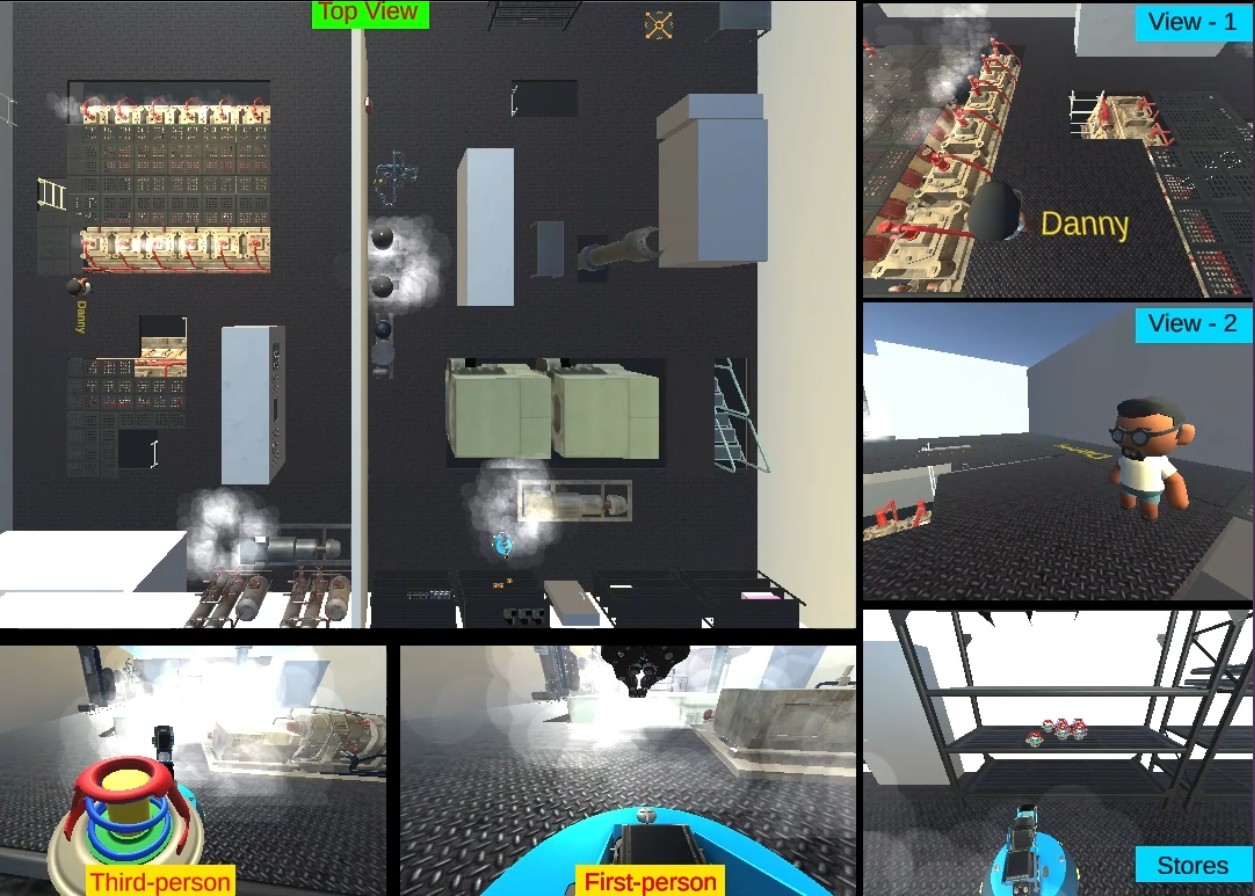
Simulation View (Click to zoom)
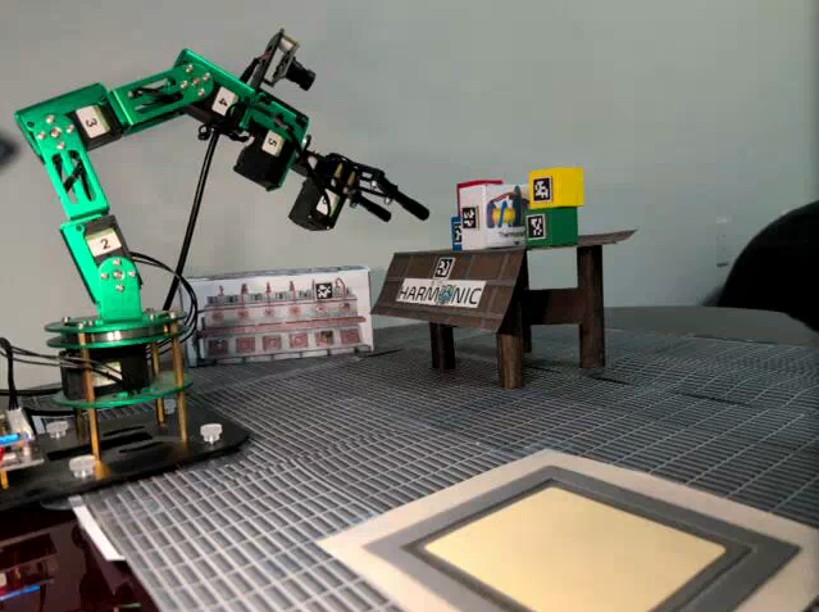
Robot View 1 (Click to zoom)
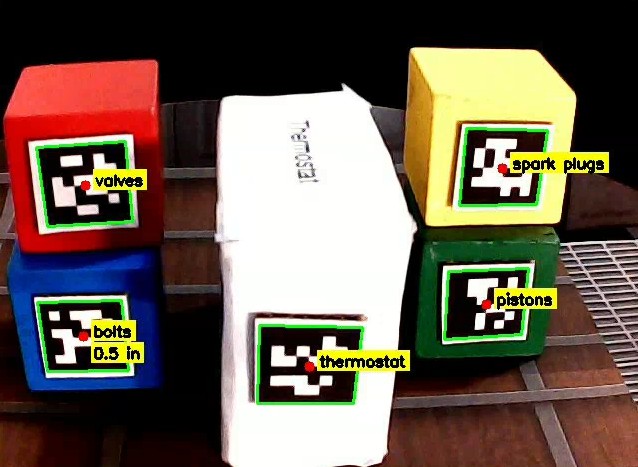
Robot View 2 (Click to zoom)
The agent activates the plan (again).
a) The awaited condition by #WAIT-EVENT.1 is now satisfied, so:
b) The NEXT step selected is #PICK-UP.1, which has no preconditions that are failing.
c) The procedure is executed.
d) The agent continues to attend to its agenda during the time this takes:
e) The procedure finishes, which sends a callback:
Important: While the agent maintains a waiting state, this does not indicate system idleness; rather, the robotic system continues active sensing operations and action execution, with the cognitive processing module awaiting task-relevant perceptual feedback to proceed with plan advancement.
UGV executing pickup sequence in simulation (Click to zoom)
Tabletop robot executing the pickup sequence (Click to zoom)
The agent activates the plan (again).
a) The NEXT step selected is #NAVIGATE-TO.1, which has no preconditions that are failing.
b) The procedure is executed.
c) The agent continues to attend to its agenda during the time this takes:
e) The procedure finishes, which sends a callback:
UGV returning thermostat to Danny in Simulation (Click to zoom)
Tabletop robot returning thermostat to drop area (Click to zoom)
The agent activates the plan (again).
a) The NEXT step selected is #GIVE.1, which has no preconditions that are failing.
b) @GIVE is a multi-step event (not shown) that causes the agent to:
- Say "Here you go." while simultaneously,
- offer the thermostat to the speaker.
Task completion: The entire fetch task is now complete:
Summary: HARMONIC has successfully completed the entire interaction cycle: understanding the problem, diagnosing potential causes, providing historical information, and physically retrieving the requested object. This demonstrates the system's ability to seamlessly integrate natural language understanding, reasoning, and physical action.
UGV drops thermostat after return (Click to zoom)
Tabletop robot drops thermostat in drop area (Click to zoom)